

RESOURCES: NUS FASS Website Management and Enablement
This is meant to be 'live' platform and media depository for designated webmasters across FASS. Please feel free to tell us to add a question or solution for any problem you have encountered and/or resolved, documents and other materials you consider useful in your job as the webmaster or content provider/uploader of your FASS Department or Division website/webpages.
Below are some resources we have compiled since NUS's websites, including FASS's, began moving onto Central Web Hosting (CWH), the WordPress platform in 2019. FASS webmasters are encouraged to click through, download, save and refer to them at will. At the same time, should they encounter items that require any updates/edits or possess additional materials and links to add to this page, we would appreciate their help in updating this page and/or just write to the FASS webmasters: Fang Yih (fyteng@nus.edu.sg)/Hay Thi (haythi@nus.edu.sg).
- - - - - - - - - - - - - - - - - - - - - -
NB
* The previous FASS Staff Profile System is NO LONGER IN USE. It was decommissioned in mid-2024, after an extensive migration exercise managed by NUS IT (running from October 2023 to May 2024), during which the profiles of all academic staff were to have been moved onto NUS Discovery. The profiles on NUS Discovery are meant to be managed by the academics themselves since they should be the only ones with access to their respective profile pages. This was the case with the previous profile system. Any query regarding anything to do with academic staff profiles that belong on NUS Discovery should be directed to Ms Verene Koh.
Website Technical Support & Assistance
This service is provided by our website developer Websparks, and for you to turn to if you encounter any technical issues and require assistance so you can properly maintain your websites.
If you have any technical challenges, please file a request in the system following the instructions below.
+++
1) Access this URL to log a ticket: https://websparks.atlassian.net/servicedesk/customer/portal/10.
In most cases, you can choose Technical Support or Reporting a Bug, whichever is suitable.
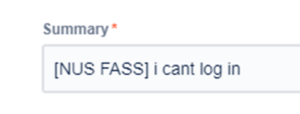
2) In the summary, start of with [NUS FASS] and then a short one liner of the issue.
3) In the description, try to give us the detailed issue, with screenshots and with the URL of the page/site you have an issue with.
4) Attachment is when you need to attach the screenshot or even a screengrab video (for this, you may consider using the Screen Recorder for Chrome).
5) Hit send and the ticket will be attended to by Helpdesk staff.
The web technical support staff will attend to you as soon as possible. Please do anticipate longer wait times when your request is filed between 6 pm and 9 am, as well as on weekends and public holidays.
Resources
- - - - - - - - - - - - - - - - - - - - - -
- - - - - - - - - - - - - - - - - - - - - -